Insurance broker software built for Hong Kong brokerages
MBID brings clients, policies, general insurance quotations, renewals, commission statements and compliance reports into one platform, with a management view for the office and a workspace for every technical representative.
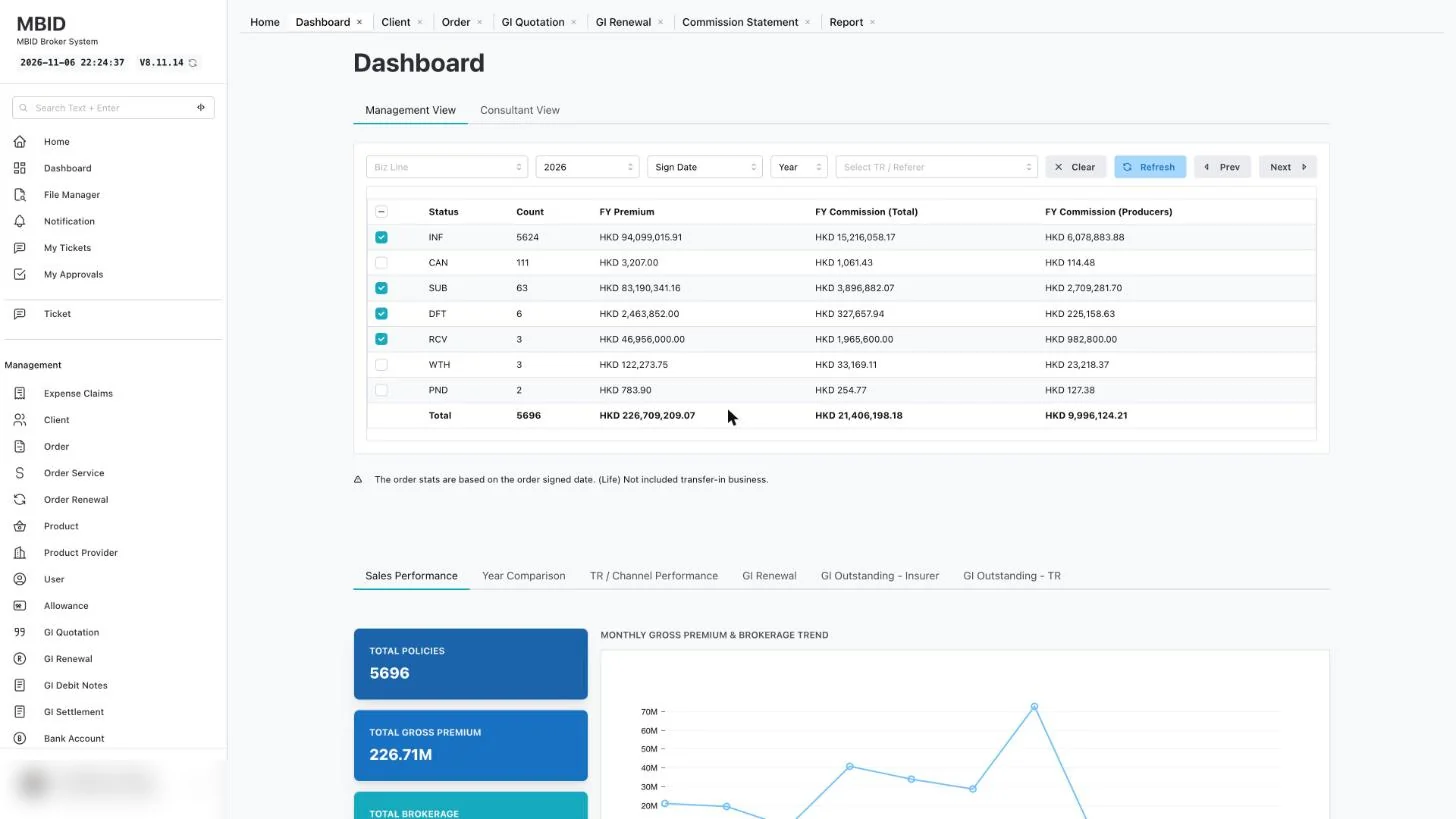
Dashboard · demo environment · Personal data blurred
Spreadsheets, inboxes and insurer portals don't add up to one book of business
Most Hong Kong broker companies place business with several insurers, and each insurer sends quotes, renewal notices and commission statements in its own format. MBID gives the office one record for every client, policy and payment, so nobody has to rebuild the picture from email.
Renewals found too late
A renewal notice sits in one consultant's inbox while the client's cover runs out.
Commission that never reconciles
Statements arrive by insurer and period, but the policy register lives somewhere else.
Compliance by spreadsheet
ID expiry, CPD hours and audit reports are tracked by hand, one file per person.
See the system your team will use
Real screens from the MBID demo environment. Client names, contact details and policy numbers are blurred.
FY premium and commission by policy status, with sales performance, year comparison and outstanding GI by insurer.
- Management and consultant views
- Filter by business line, year and TR
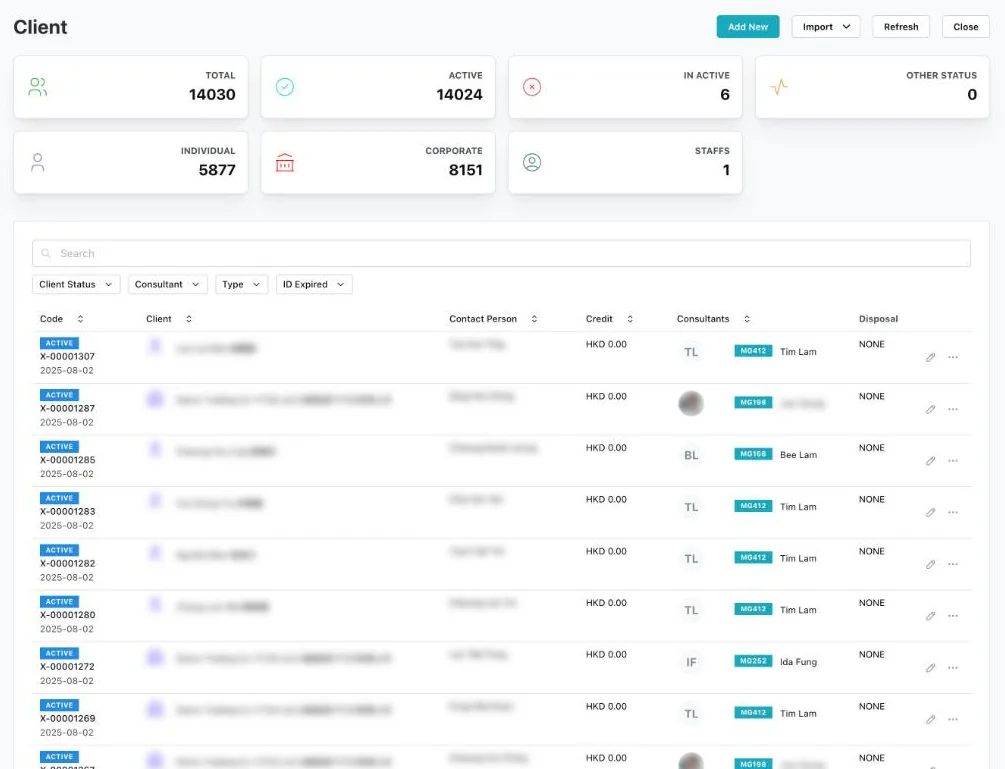
Over 14,000 individual and corporate clients in the demo, each linked to a consultant.
- Filter by status, consultant, type and ID expiry
- Import existing client lists
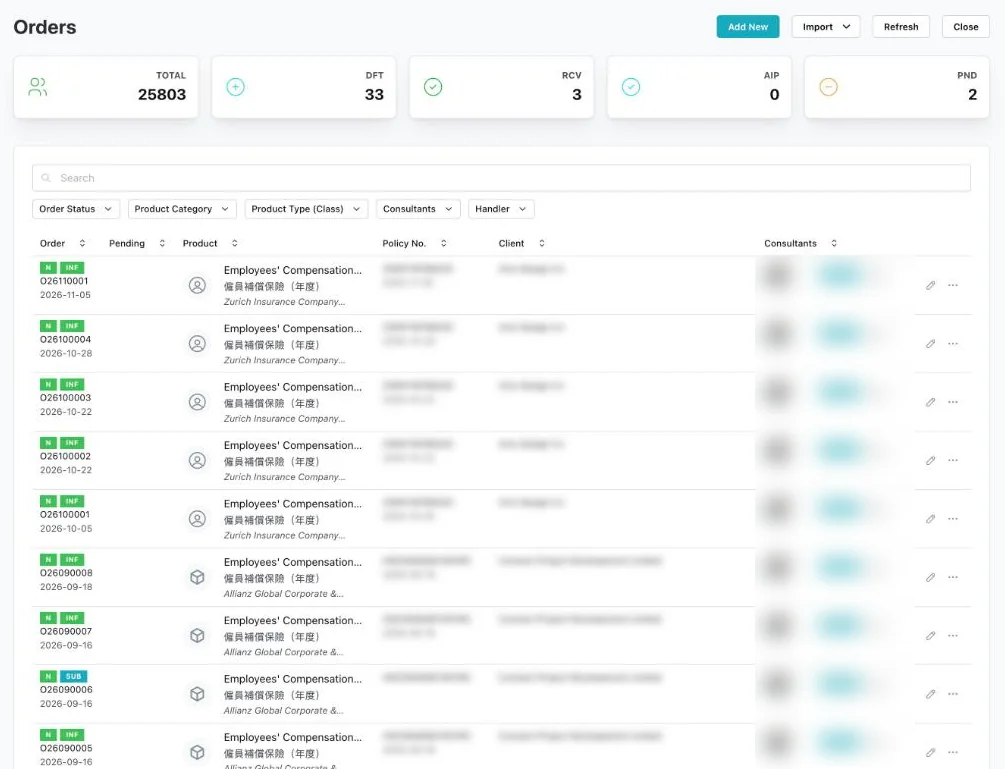
Every order with its product, insurer, policy number, client and consultant.
- Status counts: draft, received, pending
- Filter by product category, class and handler
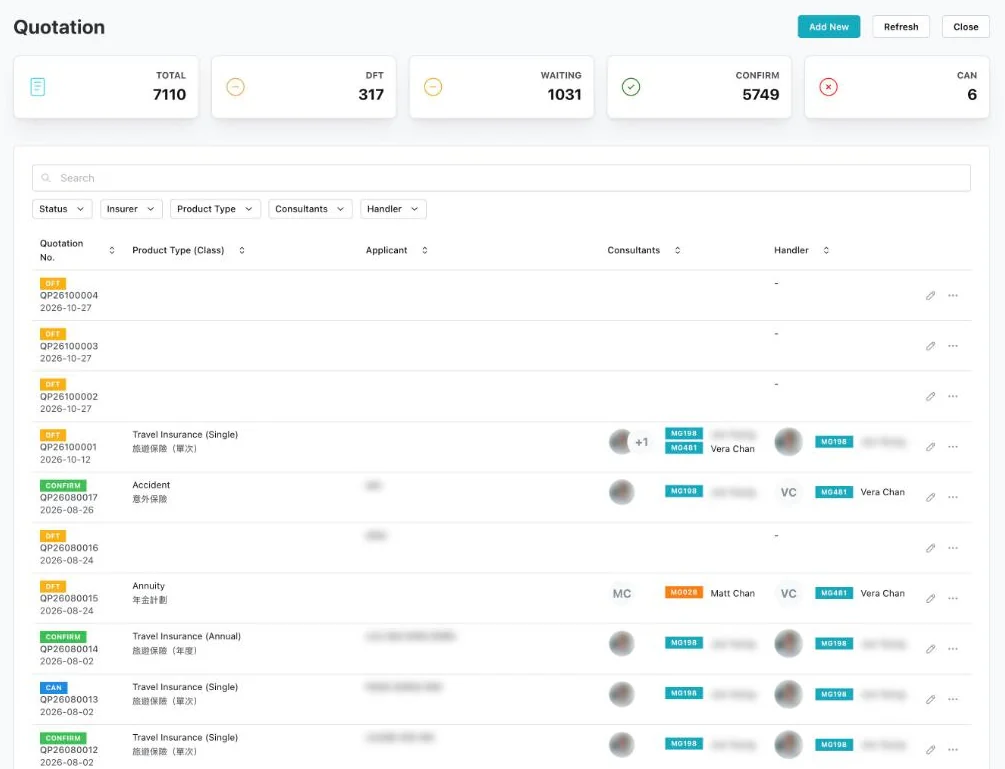
General insurance quotes tracked from draft to confirmed.
- Draft, waiting, confirmed and cancelled counts
- Filter by insurer, product type and consultant
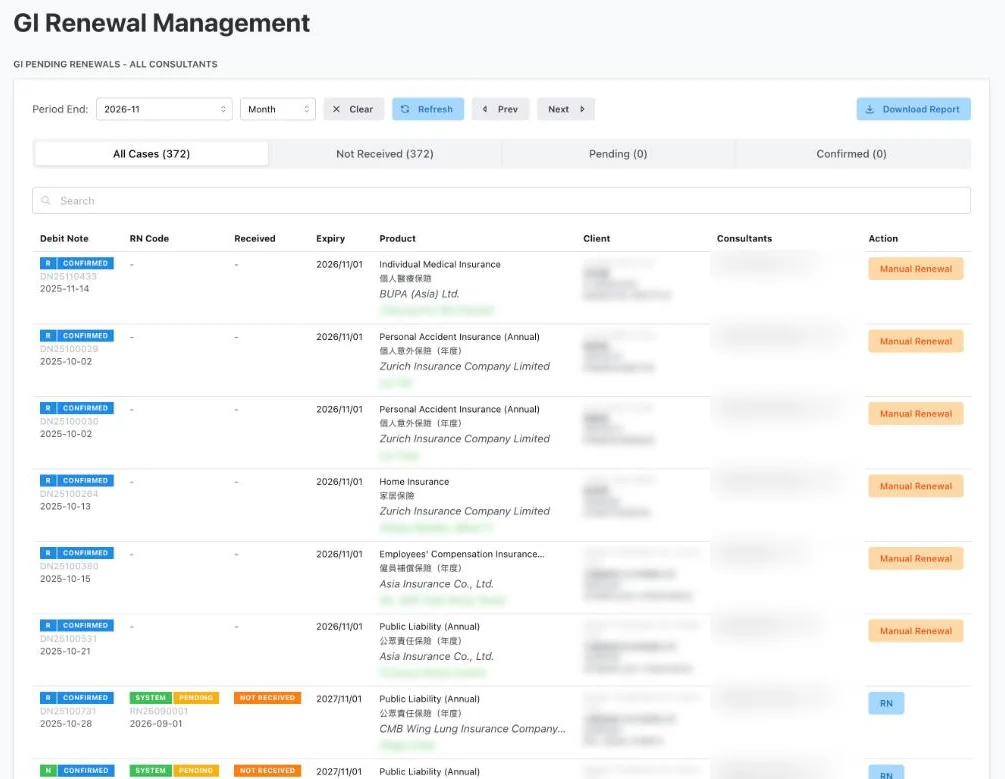
Policies due each month across all consultants, with a one-click renewal report.
- Not Received, Pending and Confirmed tabs
- Bilingual product names
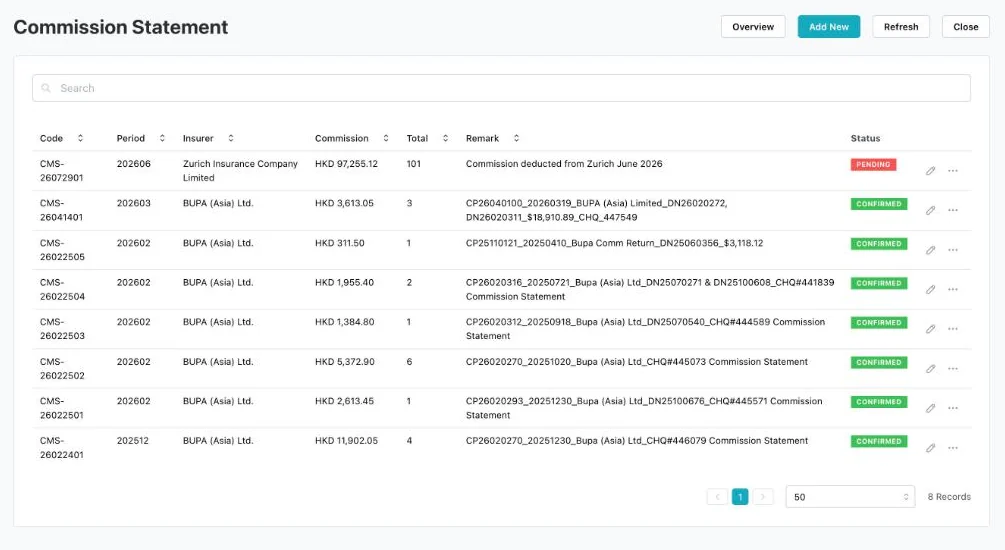
Statements by insurer and period, each marked Pending or Confirmed.
- Commission amount and number of policies per statement
- Remarks for cheque and debit note references
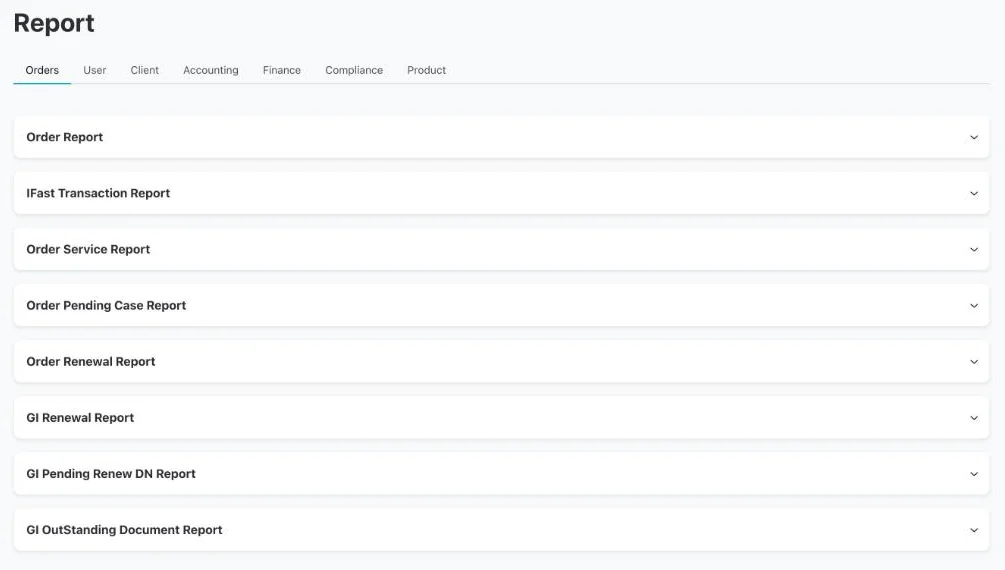
Report centre with seven categories, from orders to compliance.
- Orders, user, client, accounting, finance, compliance, product
- GI renewal and outstanding document reports
Everything a broker company runs, in one system
The management view covers the whole office. Each module links back to the same client and policy records.
Dashboard
Financial-year premium and commission totals, split by policy status and filterable by business class and year.
Client management
Individual and corporate clients with filters for status, consultant, client type and ID document expiry.
Policy register
Every order linked to its product, insurer, consultant and handler, filterable by product category and class.
GI quotation
Track each general insurance quote from Draft to Waiting to Confirm, or Cancel.
GI renewal
Policies due each month, sorted into Not Received, Pending and Confirmed, with a downloadable renewal report.
Commission statements
Statements organised by insurer and period, each marked Pending or Confirmed.
Report centre
Orders, user, client, accounting, finance, compliance and product reports in one place.
A workspace for every consultant
Technical representatives see their own clients, quotations, renewals, orders and reports, plus My CPD & CPT, quizzes and a wallet. Management sees the whole office.
A renewal workflow that starts before the notice arrives
MBID lists every policy expiring in the month and keeps it visible until it is confirmed. Here is a typical general insurance renewal cycle run in MBID.
Timings are an example; set the lead time that suits your book.
Built around how the Insurance Authority regulates brokers
Licensed broker companies answer for their technical representatives. MBID keeps the records you need when the IA, an auditor or a client asks.
- CPD tracking per consultant against the IA requirement of 15 hours per assessment period, including 3 hours on Ethics or Regulations (GL24).
- Client ID expiry filters for know-your-client follow-up.
- Compliance, accounting and finance reports from the same data the office works in.
- Separate management and consultant views, so each person sees the book they are responsible for.
Articles
Practical guides on running a Hong Kong brokerage, written by the MBID team.
Insurance broker software in Hong Kong: a 2026 buyer's guide
The ten features a Hong Kong broker company should check before choosing a broker management system, and the questions to ask every vendor.
Read the guide →General insurance renewal management: a workflow that stops missed renewals
A 60-day renewal workflow with three statuses and one monthly report, so no general insurance renewal depends on someone's memory.
Read the guide →Commission reconciliation for Hong Kong insurance brokers after the 2026 commission-spreading rule
What the IA's 70% first-year cap on participating-policy commission means for broker records, and a monthly process for reconciling insurer statements.
Read the guide →Questions brokers ask about MBID
What is MBID?
MBID is a web-based insurance broker management system for Hong Kong broker companies. It manages clients, policies, general insurance quotations and renewals, commission statements, reports and consultant CPD records in one platform.
Who is MBID for?
Licensed insurance broker companies in Hong Kong, from small general insurance brokers to firms with many technical representatives placing both general and long-term business.
Does MBID support Traditional Chinese?
Yes. MBID is built for Hong Kong teams and works in English and Traditional Chinese.
Can MBID track CPD hours for technical representatives?
Yes. Each consultant has a My CPD & CPT record, which helps the broker company check progress against the IA's 15-hour requirement, including 3 hours on Ethics or Regulations.
How does MBID handle general insurance renewals?
MBID lists policies due each month and sorts them into Not Received, Pending and Confirmed. Management can download a renewal report at any time.
How do commission statements work in MBID?
Statements are organised by insurer and period and marked Pending or Confirmed, so the finance team can reconcile what each insurer owes against the policy register.
How do I see a demo?
Contact the MBID team to book a walkthrough of the management and consultant views.
See MBID with your own workflow in mind
Book a walkthrough of the management view, renewals and commission statements.